View on GitHub

Open this notebook in GitHub to run it yourself
The functions prepare_uniform_trimmed_state and prepare_uniform_interval_state create states with uniform superposition over a discrete interval of the possible states. Both scale polynomially with the number of qubits.

Uniform Trimmed State

Function: prepare_uniform_trimmed_state Arguments:
  • m: CInt - number of states to load.
  • q: QArray[QBit] - quantum variable to load the state into.
The function loads the following superposition: ψ=1mi=0m1i|\psi\rangle = \frac{1}{\sqrt{m}}\sum_{i=0}^{m-1}{|i\rangle}

Example

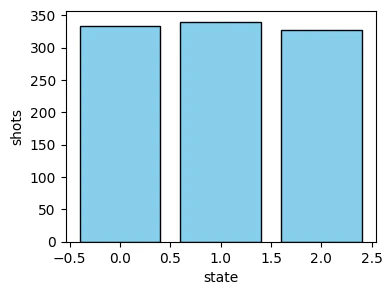
Prepare the following state on a variable of size 4 qubits.: ψ=13i=02i|\psi\rangle = \frac{1}{\sqrt{3}}\sum_{i=0}^{2}{|i\rangle}
import matplotlib.pyplot as plt

from classiq import *


@qfunc
def main(x: Output[QNum]):
    allocate(4, x)
    prepare_uniform_trimmed_state(3, x)


qmod = create_model(main)
qprog = synthesize(qmod)

result = execute(qprog).result_value()
counts = result.parsed_counts

plt.figure(figsize=(4, 3))
plt.bar(
    [c.state["x"] for c in counts],
    [c.shots for c in counts],
    color="skyblue",
    edgecolor="black",
)
plt.xlabel("state")
plt.ylabel("shots")
Output:

Text(0, 0.5, 'shots')
  

output

Uniform Interval State

Function: prepare_uniform_interval_state Arguments:
  • start: CInt - first state to be loaded.
  • end: CInt - boundary of the loaded states (not including).
  • q: QArray[QBit] - quantum variable to load the state into.
The function loads the following superposition: ψ=1endstarti=startend1i|\psi\rangle = \frac{1}{\sqrt{end-start}}\sum_{i=start}^{end-1}{|i\rangle}

Example

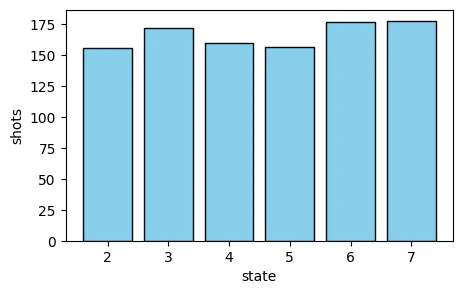
Prepare the following state on a variable of size 5 qubits.: ψ=16i=27i|\psi\rangle = \frac{1}{\sqrt{6}}\sum_{i=2}^{7}{|i\rangle}
@qfunc
def main(x: Output[QNum]):
    allocate(5, x)
    prepare_uniform_interval_state(2, 8, x)


qmod = create_model(main)
qprog = synthesize(qmod)

result = execute(qprog).result_value()
counts = result.parsed_counts

plt.figure(figsize=(5, 3))
plt.bar(
    [c.state["x"] for c in counts],
    [c.shots for c in counts],
    color="skyblue",
    edgecolor="black",
)
plt.xlabel("state")
plt.ylabel("shots")
Output:

Text(0, 0.5, 'shots')
  

output