


View on GitHub
Open this notebook in GitHub to run it yourself
Output:
data.width and transpiled_circuit.depth:
Output:
Output:
Output:
Visualization
When opening a quantum program using theshow command, the visualization provides details regarding the quantum circuit’s structure.
Key characteristics, such as gate count, qubit usage, and circuit depth, are displayed.
The visualization is organized according to the building blocks used during the quantum program construction.
These blocks represent modular components or routines in your quantum algorithm. By clicking on the ”+” sign on a block, you can expand it to reveal the underlying quantum gates, making it easier to inspect, debug, or understand the algorithm’s logic at both high and low levels.
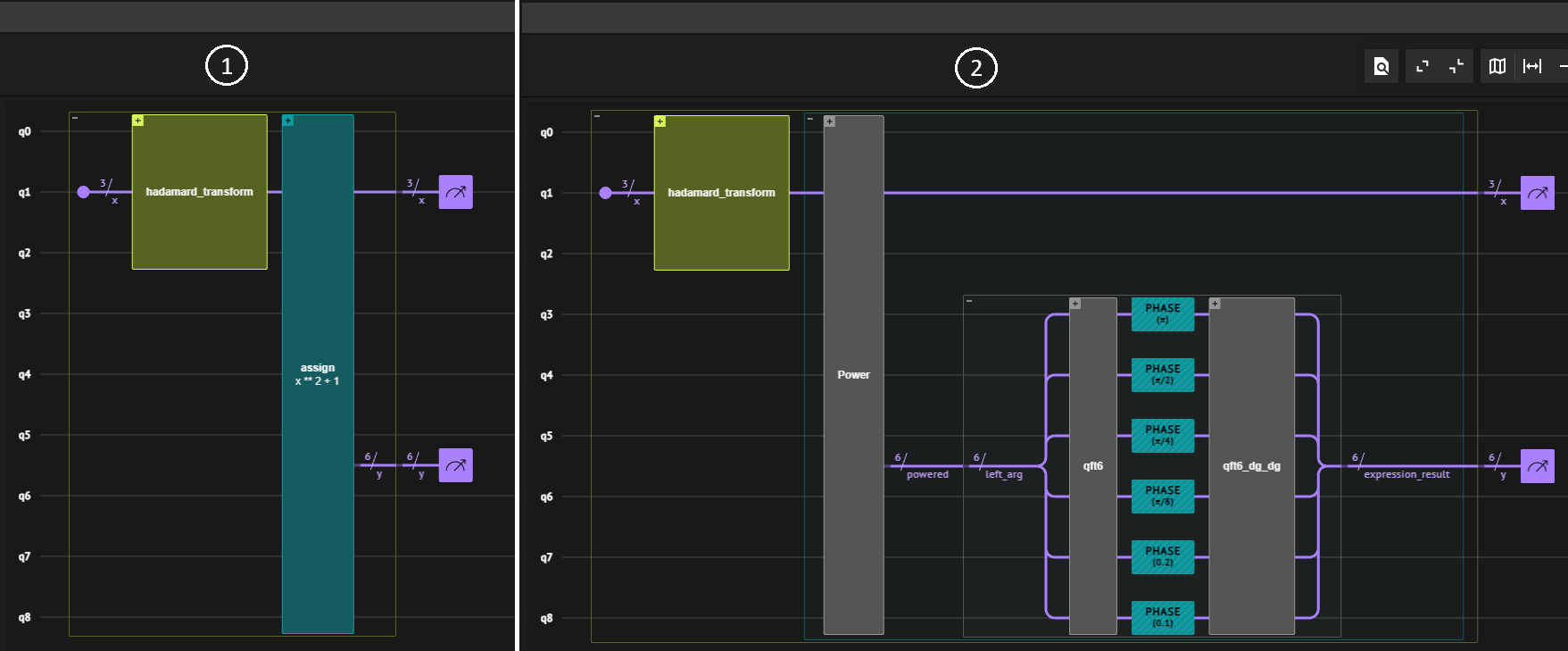
This can be seen in the following figure: the left panel represents a high-level view showing the quantum blocks used in the algorithm—such as hadamard_transform and assign x**2 + 1—while the right panel shows an expanded view of the assign block, revealing the underlying quantum gate sequence.
Gates include multiple PHASE operations and a quantum Fourier transform block (qft6), offering insight into the inner workings of this computation.
Exporting and Sharing
In addition to visualizing a quantum program, the tool provides convenient options to export the quantum circuit in multiple formats, enabling integration with other tools and workflows. Some of them are:- QASM: Allows interoperability with quantum simulators and hardware platforms.
- LaTeX: Produces a high-quality, pictorial representation of the circuit, ready for inclusion in LaTeX files.
- JPEG: Generates a graphical image of the circuit.
Exercise
Create your ownmain function and synthesize it with different constraints.
Note that OptimizationParameter is only one kind of configuration possible.
Classiq synthesis engine also supports rigid constraints of max_width, max_depth and max_gate_count.